


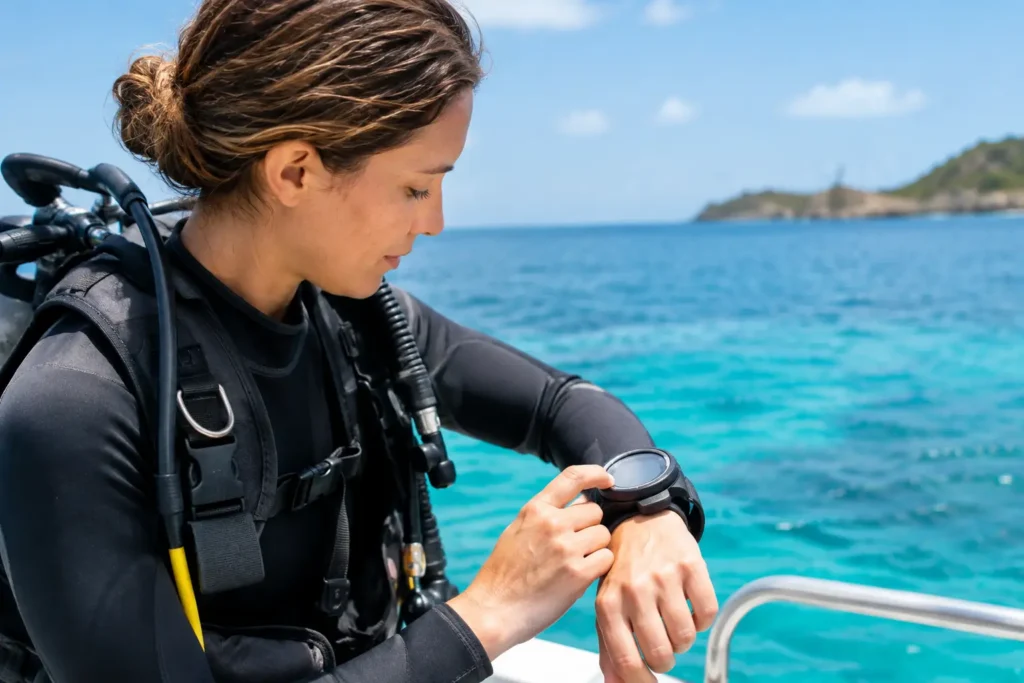
Your dive computer is not just a depth gauge with a clock. It is the device that turns your dive computer setup into real-time information: how deep you are, how long you have stayed there, how quickly you are ascending, and what your body needs before the next dive. Set it up well, and it becomes a calm, useful partner beneath the surface. Set it up casually, and you may not notice a mismatch until the boat is already moving toward the reef.
For Caribbean diving, where warm water and long bottom times can make a second or third dive feel deceptively easy, a few careful minutes before splashdown matter. Here is how to prepare your computer with the same attention you give your mask, weights, and air supply.
Start With the Right Dive Mode
Before anything else, confirm that the computer is set for the kind of dive you are actually making. Recreational divers should normally use Air mode for standard compressed-air diving or Nitrox mode when diving an enriched-air blend. Gauge mode is different: it tracks depth and time but does not calculate no-decompression limits. It is useful for specific technical applications, but it is not the setting most vacation divers want by accident.
This sounds basic, yet mode errors happen. A computer left in Gauge mode after a previous dive may show information that looks normal while withholding the decompression guidance you expected. Some computers also have Freedive or Apnea modes with rapid sampling and different alarms. Confirming the mode should be part of every pre-dive check, especially when gear has been shared, rented, packed for travel, or unused for several months.
If you are unsure what a screen icon means, stop and ask your instructor or guide before entering the water. There is no prize for solving a menu system on the back of a moving boat.
Set Your Gas Correctly, Especially for Nitrox
A Nitrox setting must match the gas in your cylinder. That means checking the analyzed oxygen percentage, then entering that exact percentage into the computer. Do not assume every Nitrox tank is 32 percent, even if that is a common blend. Analyze the cylinder, label it, and set the computer yourself before the dive.
You will also need to choose a maximum partial pressure of oxygen, often shown as PO2. Many recreational divers use 1.4 ATA for the working portion of the dive, while a more conservative setting may be appropriate depending on the plan, training, and operation. Your Nitrox instructor can help you understand what setting fits your certification and the dive profile.
The key trade-off is simple. A higher PO2 can give you a deeper maximum operating depth, but it also raises oxygen-exposure considerations. A lower PO2 gives more margin but may limit the depth where you can use that blend. Neither number should be selected just because it is what another diver uses.
For air dives, make sure the computer is set to 21 percent oxygen if it requires a gas setting. For multi-gas or transmitter-integrated models, verify every active gas and cylinder assignment. One incorrect selection can produce incorrect limits.
Never Share One Computer Between Divers
A dive computer tracks a diver’s exposure, not a buddy team’s exposure. Even when two people stay close, their depth, effort, ascent pattern, and previous dives may differ. Each diver needs a computer or must follow a clearly planned, conservative backup method under qualified supervision.
This matters even more on repetitive-dive days. Your computer retains your individual nitrogen-loading history. Handing it to a partner between dives removes the value of that record.
Choose Conservatism You Can Actually Follow
Most modern computers allow you to adjust conservatism or gradient settings. These features are valuable, but there is no universal “best” setting. The appropriate level depends on factors such as age, fitness, hydration, water temperature, workload, dive frequency, and how much margin you want in the plan.
For a relaxed vacation schedule, many divers prefer a more conservative setting. It may shorten the displayed no-decompression limit or lengthen calculated surface intervals, but that is not a failure of the computer. It is the computer giving you more buffer.
Think about the full day, not just the first descent. A beautiful wall dive followed by another reef dive after lunch may still be well within recreational limits, yet fatigue, sun, dehydration, and a celebratory drink later can all make conservative choices worthwhile. Your computer cannot measure every personal factor, so it makes sense to leave room in the plan.
What you should not do is repeatedly change conservatism to chase extra bottom time. If the limit is shorter than the dive you hoped for, adjust the dive plan, choose a shallower profile, or save the deeper site for another day.
Check Units, Time, and Basic Alerts
A computer set to meters when you think in feet can create immediate confusion. Before the boat leaves, confirm depth units, temperature units, and whether your ascent rate is shown in feet or meters per minute. If you are traveling with a computer you bought abroad, do not assume its settings survived a battery change or factory reset.
Set the correct time and date as well. While this does not change decompression calculations, it helps keep your log accurate and makes it easier to identify a dive later. For divers using app-based logs, verify that the computer has enough battery and that its connection system is working before the trip, not after a full day on the water.
Audible and visual alarms deserve a quick review. Make sure you understand what the computer will alert you to, including ascent-rate warnings, maximum-depth alarms, safety-stop prompts, low-battery warnings, and no-decompression-limit notifications. If your device lets you set a depth alarm, choose one that supports the site briefing rather than replacing it.
An alarm is a prompt to look, assess, and respond. It is not an excuse to panic or shoot toward the surface.
Pair Your Computer With the Dive Plan
Your guide’s briefing and your computer should tell the same story. Before descending, know the maximum planned depth, expected bottom time, current conditions, entry and exit method, and the signal for turning the dive. If you are using air integration, compare the computer’s tank-pressure reading with your analog pressure gauge before entering the water.
On a Bayahibe reef or wreck, conditions may invite you to linger over a coral formation, a turtle passing through, or a school of silversides flashing in the blue. That is exactly why you should agree on the plan first. Your computer will show your personal limits, while the guide manages the group route, site conditions, and timing. Both matter.
For multi-level dives, begin deeper and gradually work shallower. Watch your no-decompression time throughout the dive rather than waiting for an alarm. A computer is most useful when you read it proactively, not when it is already demanding a change of plan.
Practice Reading the Screen Before You Descend
A new computer can feel obvious in the shop and surprisingly confusing underwater. Spend a few minutes on land identifying the information displayed during a dive: current depth, maximum depth, elapsed time, no-decompression limit, ascent-rate indicator, safety-stop countdown, and gas pressure if applicable.
Then decide where you will wear it. A wrist-mounted computer should be visible without twisting awkwardly or moving hoses. A console-mounted unit should be secured so it cannot drag across coral or bang against the boat ladder. If you wear a thick wetsuit or rash guard, check that the strap fits securely but can still be adjusted with wet hands.
Bring the manual or save its instructions offline on your phone when traveling. Different brands use different abbreviations, button logic, and warning sequences. Familiarity is a safety feature.
The Five-Minute Pre-Dive Computer Check
Right before gearing up, use a short routine. Confirm the correct mode, gas mix, PO2 setting, conservatism level, units, battery status, and time. Then check that the screen is clear and responsive, and compare any air-integrated reading with your physical gauge.
If something looks wrong, do not try to force a fix while the crew is calling divers to the platform. Tell the team. A professional dive center would always rather help you reset a computer at the dock than manage confusion underwater.
At Sharky’s Crew, our guides can review a guest’s dive computer during the briefing, particularly when a diver is new to Nitrox, using an unfamiliar rental unit, or returning to diving after time away. That quick conversation helps everyone start the dive with the same plan and the same expectations.
After the Dive, Let the Computer Keep Working
Keep the computer with you between dives. Do not leave it in direct sun on a hot deck, rinse it with high-pressure water, or hand it to another diver. A gentle freshwater rinse after the day protects buttons and contacts, especially around saltwater exposure.
Review the log while the details are fresh. Did you stay within the plan? Did your air use match what you expected? Were you comfortable with the chosen conservatism? Those answers can help shape tomorrow’s dives far better than simply copying the same settings again.
Your dive computer cannot replace training, good buoyancy, a proper buddy check, or sound judgment. What it can do is give you clear information when the reef is calling for one more minute. Set it carefully, read it often, and let the best part of the day remain what is around you, not what is flashing on your wrist.
